How to Submit Your Sri Lanka Income Tax Return Online (2025/2026)

Last updated: 13 Nov 2026 · ganna.lk guides

File your 2025/2026 individual income tax return on the IRD e-Services portal (eservices.ird.gov.lk) before 30 November 2026: log in with your TIN and password, open Income Tax Return — Individual for Y/A 2025/2026, fill each schedule and type each total into its cage, then submit and keep the acknowledgement. Any balance tax is due earlier, by 30 September 2026. Prepare your figures first with the free return helper — it gives you every figure with its cage number.

Before you start: what you need

Have these ready before you log in — the portal does not save a half-filled return for you to finish later:

  • Your TIN and password. Your PIN is issued when you first activate your e-Services account (see the FAQ below).
  • T-10 from your employer — your salary for the year and the APIT deducted.
  • Interest certificates from your bank — interest before the 10% deduction, plus the AIT deducted.
  • APIT figures from your payslips — what your employer actually deducted, month by month.
  • For business or freelance income: your receipts and expense records for the year.
  • For rent: rental agreements and receipts.

Filing for the first time? Register for a TIN on ird.gov.lk, then activate e-Services: on eservices.ird.gov.lk choose First Time User, enter your TIN and NIC, and the IRD sends a PIN by email or SMS.

Step 1 — Work out your figures first

Do the maths before you touch the portal. The free Tax Return Helper takes your income, reliefs and credits and gives you the tax (or refund), every schedule total, and the cage each figure goes into. Its second-look panel flags the common mismatches — APIT that does not match your salary, AIT that does not match your interest — before the IRD sees them.

Step 2 — Log in to the IRD e-Services portal

Go to eservices.ird.gov.lk (from ird.gov.lk, e-Services → Individual Taxpayer) and log in with your TIN and password. This is the IRD's RAMIS portal — the same place you registered.

Step 3 — Open the return

From the dashboard, open the return filing section and select Income Tax Return — Individual. Choose the Year of Assessment 2025/2026 — income from 1 April 2025 to 31 March 2026 — and confirm your residential status.
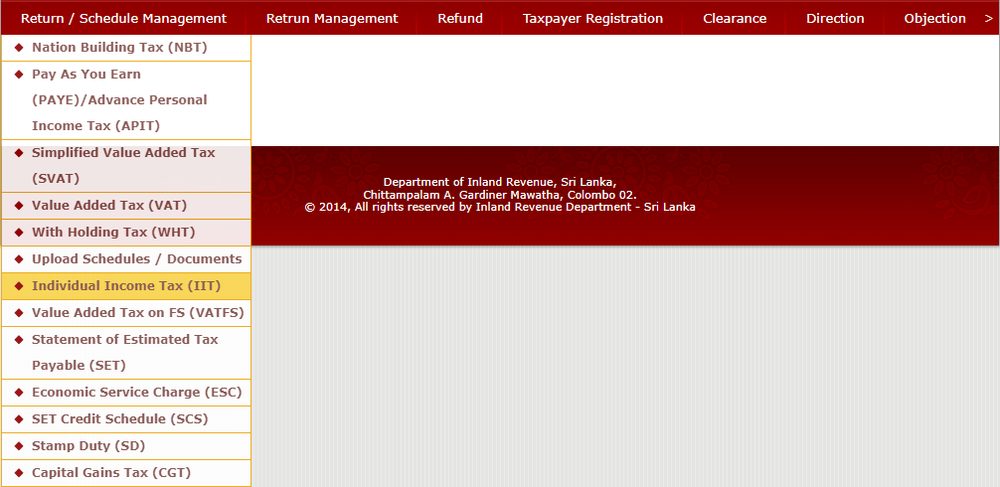
The Return / Schedule Management menu with Individual Income Tax highlighted
From the top menu: Return / Schedule Management, then Individual Income Tax (IIT). The example shows Y/A 2022/2023; the screens and cage numbers match the 2025/2026 return. Screenshot: IRD, How to file IIT quick guide.
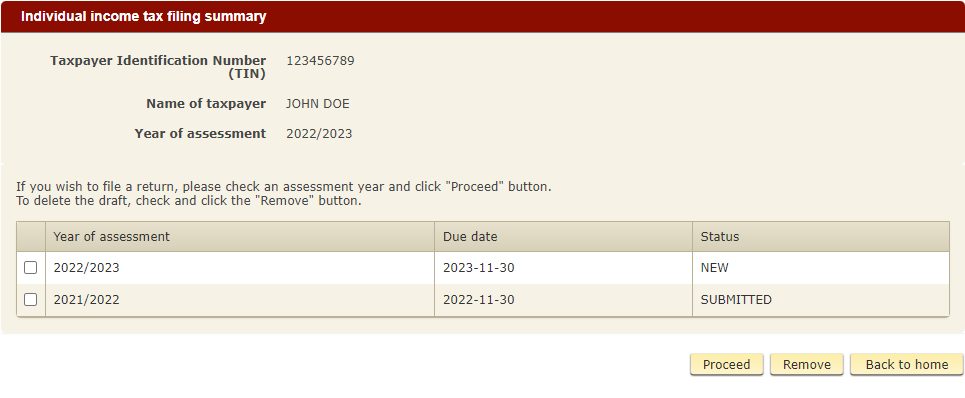
Filing summary: pick the year and click Proceed
Tick the 2025/2026 row and click Proceed. The IRD's example shows 2022/2023 — the screen is the same. Screenshot: IRD, How to file IIT quick guide.

Step 4 — Fill each schedule

Work through the schedules that apply to you, then type each total into the cage shown. The portal applies the Rs. 1,800,000 personal relief and computes the tax as you go:

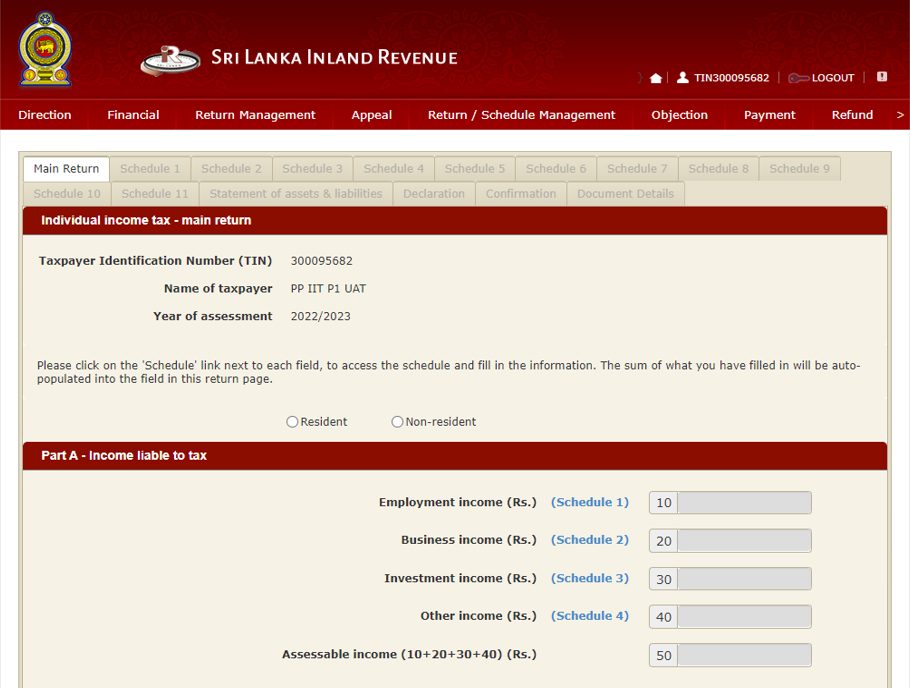
Schedule 1 — Employment incomeCage 10
Schedule 2 — Business / freelance incomeCage 20
Schedule 3 — Investment income (interest, rent, gains)Cage 30
Schedule 4 — Other incomeCage 40
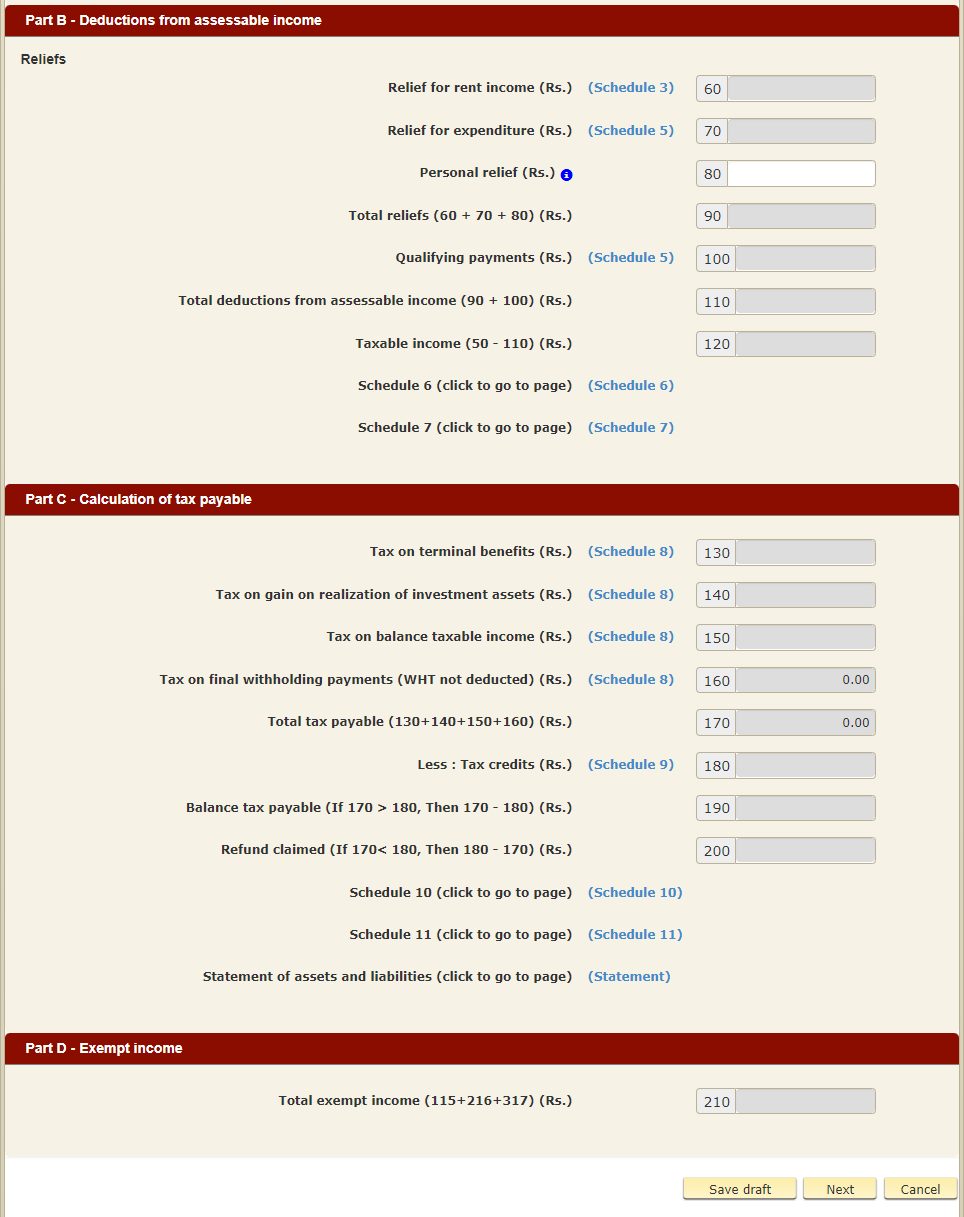
Schedule 5 — Reliefs (personal relief Rs. 1,800,000, rent 25%, solar up to Rs. 600,000, charity)Cages 60–110
Schedule 8 — Tax on taxable incomeCages 120–170
Schedule 9 — Credits (APIT, AIT, instalments)Cage 180

One common mistake:

Main Return tab, Part A, with cage numbers 10 to 50
The Main Return tab, Part A: each income goes in its cage — employment 10, business 20, investment 30, other 40. Screenshot: IRD, How to file IIT quick guide.
Main Return Parts B, C and D, with cage numbers 60 to 210
Parts B, C and D: reliefs (cages 60–110), the tax (120–200) and exempt income (210). Screenshot: IRD, How to file IIT quick guide.
your EPF is not a deduction. The 8% your employer takes is a payroll deduction that affects your take-home pay only — it never goes on the return.

Step 5 — Check, submit, keep the proof

Review every figure against your certificates, and check the portal's tax against your own working before you submit — they should match. Then submit, download the acknowledgement, and save the confirmation number. That acknowledgement is your proof you filed on time.
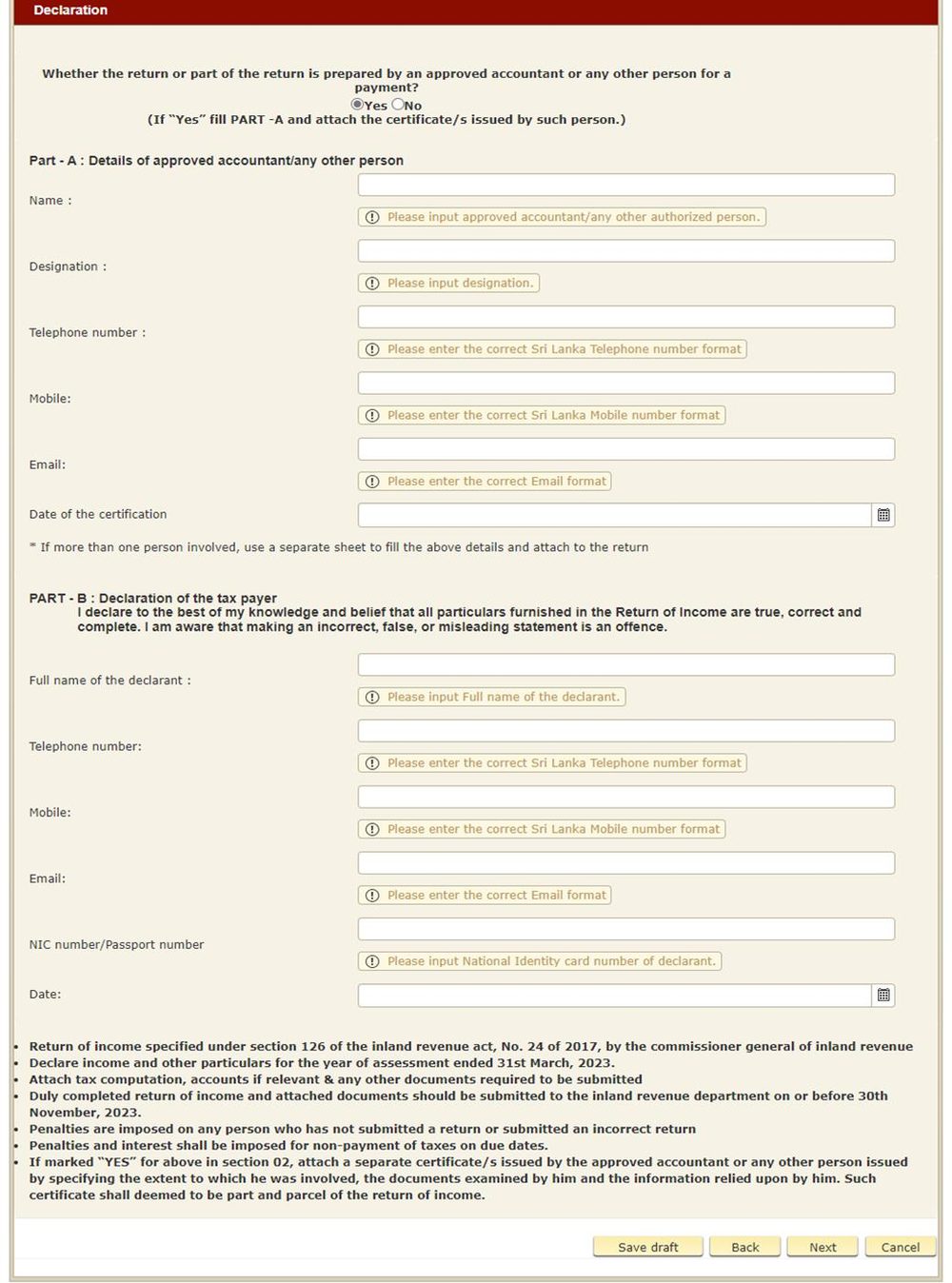
Declaration tab
The Declaration tab: who prepared the return, and your own declaration that the figures are true. Screenshot: IRD, How to file IIT quick guide.
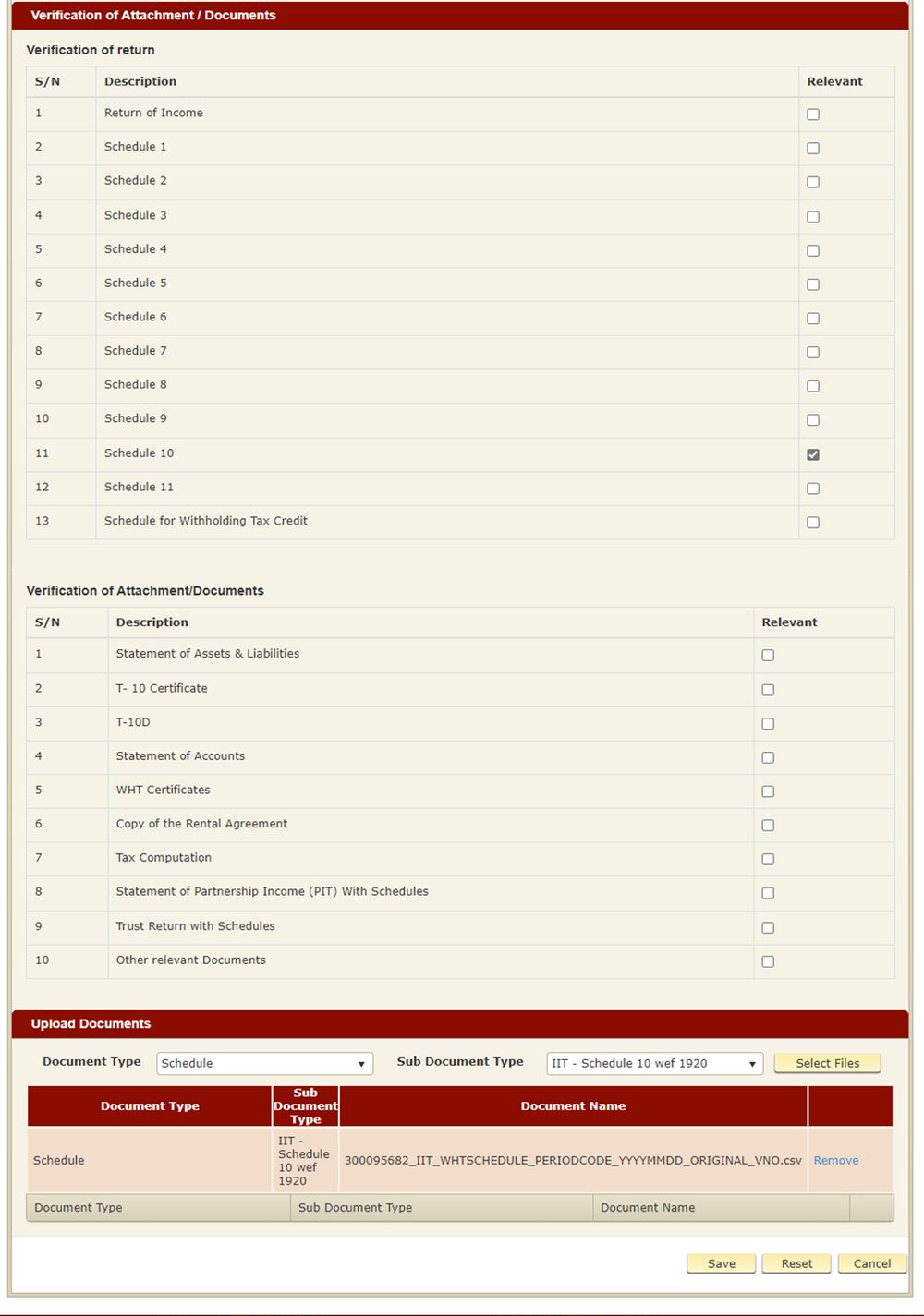
Verification of documents and upload screen
Tick which schedules and documents apply, then upload them — the IRD names each file with your TIN and the year. Screenshot: IRD, How to file IIT quick guide.

Step 6 — Pay any balance

The portal shows the balance to pay or the refund due. Pay online through the portal, by bank deposit, or by cheque payable to the Commissioner General of Inland Revenue — using your TIN and the assessment year as the reference. The balance is due by 30 September 2026; the return itself by 30 November 2026.

After you file

The acknowledgement is immediate. A refund, if one is due, takes months to arrive. Keep all your certificates and the acknowledgement for 5 years — the IRD can ask for them. If the IRD sends you an assessment you disagree with, you can object within 30 days. All the tax tools are on the Tax hub.

Skip the reading: make it now

Free, no sign-up. Your figures never leave your device.

Prepare your return free →

Common questions

Questions

In most cases, yes. APIT is a deduction from your salary, not a return. You must file if you are registered for income tax — for example if your total income is over Rs. 1,800,000, or you have rent, interest, business or freelance income. The one exception (IRD Notice PN/IT/2026-02): if your only income is employment income with APIT deducted, no balance is payable (interest up to Rs. 5,000 excepted), and no IRD file was ever opened in your name, you do not have to file.

More guides

Free Invoice Format for Sri Lanka (LKR)

Every field a Sri Lankan invoice needs, LKR formatting, invoice numbering, and what changes if you're VAT-registered.

Quotation Format for Sri Lanka

How to write a quotation that protects your price: validity periods, advance deposits and acceptance terms — with a worked example.

Invoice vs Quotation vs Receipt

Invoice, quotation or receipt — which document for which moment, and the shortcuts that are perfectly fine for small jobs in Sri Lanka.

How to Send an Invoice on WhatsApp Professionally

Send an invoice on WhatsApp the professional way: the 4-step flow, what your client sees, and habits that make you look established.

Bank Details & Payment Terms on Your Invoice

Which details to include, due dates that get you paid, and killing the “account number please?” round-trip.

Invoicing for Instagram & WhatsApp Sellers

One invoice per order, in the same chat: the 60-second workflow for Sri Lanka's Instagram, WhatsApp and DM sellers — free tools included.

Flat Rate vs Reducing Balance: What Your Lease Really Costs

Why a 12% flat quote costs the same as 20.3% reducing, the worked example and the 3 questions to ask before you sign.

How to Invoice as a Freelancer in Sri Lanka

Scope, revisions, deposits, payment terms, with a realistic sample invoice you can open pre-filled in the tool.

How to Price Products in Sri Lanka

The 4 cost buckets every product needs, the margin vs markup trap, and a worked coconut-cake example — with a free multi-product costing calculator.

General information only, not tax advice. Confirm your tax position with an accountant.

Share
WhatsAppEmail